
MEPCO Customer ID vs Reference Number – Key Differences Explained
When checking your electricity bill online, you may notice two different numbers: the MEPCO Customer ID and the MEPCO Reference Number. Both are printed on your electricity bill, but they are separate identifiers used to find your billing information.
Understanding the difference between a MEPCO Customer ID vs Reference Number can help you avoid lookup errors, retrieve a duplicate bill, and access your latest electricity bill more easily.
In this guide, you will learn what each number means, where to find it, how to use it for online bill checking, and what to do if you cannot locate either number.
What Is a MEPCO Reference Number?
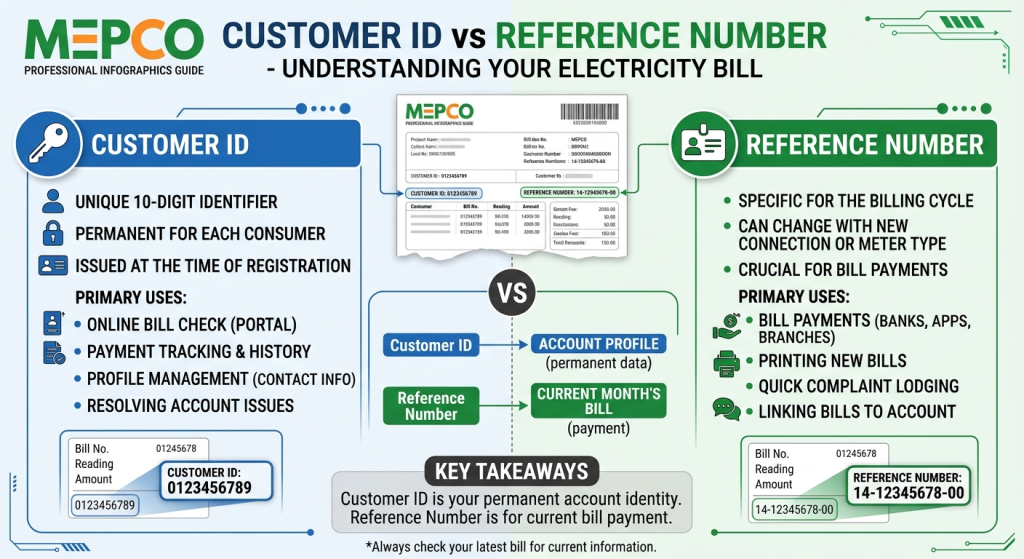
A MEPCO Reference Number is an identifier associated with your electricity connection. It is commonly used to retrieve your electricity bill through the online billing system.
The reference number typically contains 14 digits, often printed with spaces for readability. On some bills, a letter such as U or R appears after the number; follow the format requested by the online billing form.
You can find the reference number on a previous MEPCO electricity bill, usually in the account information section near the top.
What Is the MEPCO Reference Number Used For?
Your reference number can help you:
- Check your latest MEPCO electricity bill online.
- View the payable amount and due date.
- Download or print a duplicate bill.
- Retrieve billing information for your electricity connection.
- Refer to your connection when making billing inquiries.
You can check your bill through the official PITC MEPCO bill portal.
What Is a MEPCO Customer ID?
The MEPCO Customer ID, often labelled Consumer ID on the electricity bill, is another identifier associated with your consumer account.
On commonly used MEPCO bill formats, the Consumer ID is a separate number, typically containing 10 digits. Its exact presentation may vary depending on the bill format.
The Customer ID can serve as an alternative way to retrieve billing information when the online form supports that search option.
What Is the MEPCO Customer ID Used For?
Depending on the available service, your Customer ID may help you:
- Search for your electricity bill.
- Identify the relevant consumer account.
- Retrieve billing information through a supported online form.
- Distinguish your account from other electricity connections.
Keep in mind that a Customer ID is not the same as your meter serial number, bill number, or CNIC.
MEPCO Customer ID vs Reference Number: Key Differences
The primary difference is that the two numbers identify your electricity account or connection in different ways. Although both may be accepted by a supported bill-search service, they should not be treated as interchangeable in every form.
| Feature | MEPCO Customer ID | MEPCO Reference Number |
|---|---|---|
| Common label | Consumer ID or Customer ID | Reference No. |
| Typical length | 10 digits | 14 digits |
| Main purpose | Identifies the consumer account | Identifies the electricity connection for billing lookup |
| Printed on bill | Yes, on commonly used bill formats | Yes |
| Online bill search | Use when Customer ID search is available | Use the Reference No. option |
| Same as meter number? | No | No |
The numbers above describe common MEPCO bill formats. Always check the labels printed on your own bill rather than relying only on the number of digits.
Where to Find Your MEPCO Customer ID and Reference Number
Both identifiers can usually be found on a previous electricity bill. Follow these steps to locate them.
- Find your latest or any previous MEPCO bill.
- Look near the top of the bill where consumer and connection details are printed.
- Find the field labelled Consumer ID or Customer ID.
- Locate the separate field labelled Reference No.
- Copy the number you need, making sure every digit is correct.
If you have lost your current bill, an older bill for the same connection is often useful because the identifiers generally remain associated with that connection.
You can also contact MEPCO through its official service channels if you no longer have access to a previous bill.
How to Check a MEPCO Bill Using a Reference Number
The reference number is a common way to retrieve your MEPCO bill online.
Step-by-step instructions
- Open the official MEPCO bill-checking page.
- Select the Reference No. search option.
- Enter the reference number printed on your bill.
- Follow the form’s instructions for any additional character or format selection.
- Submit the details.
- Review the bill displayed on the screen.
After your bill loads, check the consumer name and address to make sure the record belongs to the correct connection. You can then use the available options to view, print, or save a copy.
How to Check a MEPCO Bill Using a Customer ID
If you have the Customer ID but not the reference number, you may still be able to retrieve your bill.
- Visit the PITC MEPCO bill portal.
- Select the Customer ID option if it is available.
- Enter your Customer ID exactly as printed on your bill.
- Complete any verification required by the page.
- Submit the information and review the result.
If the form does not accept your Customer ID, check whether you selected the correct search option. A Customer ID entered into a reference-number field may produce an error.
Can You Check a MEPCO Bill Without Both Numbers?
If you do not have either identifier, checking the bill online may be more difficult. The usual solution is to locate a previous bill or request assistance from MEPCO.
Try these options:
- Look for an old paper bill.
- Check a saved bill PDF or photograph.
- Search your email or messages if you previously received a digital bill.
- Contact MEPCO customer service or visit the relevant customer service office.
Do not enter your CNIC, meter number, or other unrelated details into a field that specifically requests a Reference Number or Customer ID.
Common MEPCO Bill Lookup Errors and Solutions
Sometimes the online bill portal does not retrieve the expected information. These simple checks can help.
1. Invalid Reference Number
Check that you entered all 14 digits correctly. Remove spaces if the form requires digits without spaces, and follow any instructions concerning a trailing letter.
2. Customer ID Not Accepted
Make sure you selected Customer ID rather than Reference No. The form may require a different identifier depending on the selected search method.
3. Bill Not Found
Verify the number against a previous bill. If the information is correct but the bill still does not appear, try again later or contact MEPCO for assistance.
4. Website Not Loading
Check your internet connection, refresh the page, and try an updated browser. A temporary technical issue may also prevent the service from responding.
5. Incorrect Consumer Details
If the retrieved bill displays a different name or address, do not assume it is your bill. Recheck the identifier before using or sharing the document.
Important Tips for MEPCO Consumers
Keep these points in mind when using your electricity bill identifiers:
- Save a copy of a previous bill for future reference.
- Store your Reference Number and Customer ID separately and label them correctly.
- Check the consumer name and address before downloading or printing a bill.
- Use the official billing portal when possible.
- Avoid sharing full bill images publicly because they may contain personal and connection information.
- Never provide your banking PIN or OTP to someone claiming they need it to retrieve your electricity bill.
For additional billing information, visit the official MEPCO website.
Frequently Asked Questions
Is the MEPCO Customer ID the same as the Reference Number?
No. They are separate identifiers printed on the electricity bill. The Customer ID is commonly shown as a 10-digit Consumer ID, while the Reference Number typically contains 14 digits.
Which number should I use to check my MEPCO bill online?
You can generally use the Reference Number. If the official billing form offers a Customer ID option, you may use that identifier instead.
Where is the MEPCO Reference Number printed?
It is usually printed near the top of the electricity bill in the account information section, next to the Reference No. label.
Can I use my Customer ID to download a duplicate bill?
Yes, if the bill-checking service supports Customer ID searches. Select the correct search option and enter the number accurately.
Does the MEPCO Reference Number change every month?
The reference number is generally associated with the electricity connection and remains the same across monthly bills. Check your latest or previous bill if you need to confirm it.
Can I check my MEPCO bill using my CNIC?
The standard online bill-search form asks for a Reference Number or a supported Customer ID. A CNIC is not a substitute for those identifiers in the standard lookup process.
Conclusion
Understanding MEPCO Customer ID vs Reference Number makes it easier to find the correct information when checking your electricity bill online. The Reference Number typically contains 14 digits, while the Customer ID, often labelled Consumer ID, commonly contains 10 digits.
Both identifiers may help retrieve billing information, but you must select the correct search option on the online portal. Keep a previous bill available, enter the requested number carefully, and use official MEPCO or PITC resources if you experience problems.