MEPCO Bill Payment Methods 2026 – Online, ATM, Mobile Banking & More
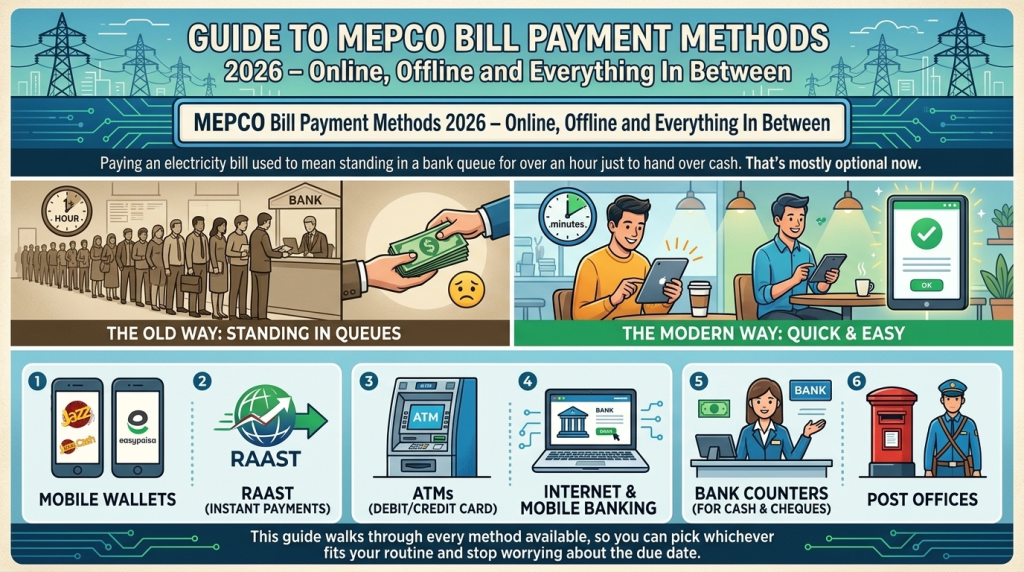
Paying your electricity bill does not have to mean standing in a long queue at a bank. With several digital and traditional options now available, MEPCO bill payment can be completed through mobile banking, internet banking, mobile wallets, ATMs, bank branches, and other supported payment channels.
Whether you want to pay your MEPCO bill online from home or prefer visiting a physical payment point, there is an option for almost every routine. In this guide, you will learn the most common MEPCO bill payment methods, how they work, and what to do after making a payment.
Before making your payment, you can first check your MEPCO bill online to verify the current amount and due date.
What Do You Need for MEPCO Bill Payment?
Before paying your electricity bill, keep your MEPCO bill or reference number ready. Most online payment methods require the reference number to retrieve your current bill.
You may need:
- Your MEPCO reference number
- Current bill amount
- Mobile banking or wallet account
- ATM/debit card for ATM payments
- Cash for bank or other physical payment points
- Transaction receipt after payment
Always check the bill details and amount before confirming a transaction.
MEPCO Bill Payment Online
Online payment is one of the most convenient ways to pay your MEPCO electricity bill. You can make the payment from your home without visiting a bank or waiting at a counter.
Depending on your bank or payment provider, you may be able to use:
- Mobile banking
- Internet banking
- JazzCash
- Easypaisa
- Supported digital payment services
- Other available utility-bill payment channels
The exact steps can vary between apps and banks, but the basic process is usually similar.
Pakistan’s payment infrastructure also includes internet banking, mobile banking, ATMs and other digital payment channels. More information is available from the State Bank of Pakistan payment systems page
General Online Payment Steps
- Open your bank or payment app.
- Go to the Bill Payment or Utility Bills section.
- Select Electricity.
- Choose MEPCO.
- Enter your MEPCO reference number.
- Check the displayed bill amount.
- Confirm the payment.
- Save your transaction receipt or confirmation.
After completing the payment, keep the transaction ID or digital receipt until the payment has been properly recorded.
MEPCO Bill Payment Through Mobile Banking
Most major banks provide utility-bill payment facilities through their mobile applications. If your bank supports MEPCO bill payments, you can usually complete the transaction directly from your smartphone.
How to Pay Through Mobile Banking
- Log in to your bank’s official mobile application.
- Open Payments or Bill Payment.
- Select Electricity.
- Select MEPCO.
- Enter your reference number.
- Verify the bill information.
- Confirm the transaction.
- Save the confirmation message or receipt.
Mobile banking is particularly useful if you want to pay your bill without visiting a physical payment location.
Pay MEPCO Bill Through JazzCash
JazzCash can also be used for utility-bill payments where the MEPCO service is available in the application.
Steps to Pay MEPCO Bill Through JazzCash
- Open the official JazzCash app.
- Select the bill-payment option.
- Choose Electricity.
- Select MEPCO if available.
- Enter your reference number.
- Review the bill amount and details.
- Confirm the payment.
- Save the transaction information.
Before completing the payment, carefully check that the retrieved bill belongs to the correct electricity connection.
MEPCO Bill Payment Through Easypaisa
Easypaisa is another convenient option for paying utility bills digitally. If MEPCO is available in the utility-bill section of your Easypaisa account, you can pay without visiting a bank.
How It Works
- Open Easypaisa.
- Select Bill Payments.
- Choose Electricity.
- Select MEPCO.
- Enter your required bill information.
- Verify the amount.
- Confirm the transaction.
- Keep the digital receipt.
The names and locations of options inside mobile applications can change, so follow the current instructions shown in the official app.
Pay MEPCO Bill Through ATM
If you do not want to use a mobile application, an ATM may provide another payment option. Availability depends on the bank and ATM network.
General ATM Payment Process
- Insert your ATM/debit card.
- Enter your PIN.
- Select Bill Payment or a similar option.
- Choose the electricity-bill category.
- Select MEPCO where available.
- Enter your reference number.
- Check the displayed amount.
- Confirm the payment.
- Collect and keep the receipt.
ATM menus can differ from one bank to another, so follow the instructions displayed on your particular ATM.
MEPCO Bill Payment Through Internet Banking
Internet banking is useful for customers who prefer making payments from a desktop or laptop.
After logging into your bank’s official website, look for the utility or bill-payment section. Select MEPCO, enter the required reference information, verify the bill amount, and authorize the transaction.
Always make sure you are using your bank’s official website and never enter your banking password or OTP on an unknown website.
Pay MEPCO Bill at a Bank
Traditional bank payment is still useful for people who prefer cash or a physical receipt.
To pay your bill at a bank:
- Take your current MEPCO bill with you.
- Visit a payment point that accepts MEPCO bills.
- Submit your bill at the relevant counter.
- Pay the required amount.
- Collect the stamped receipt.
- Keep the receipt for your records.
If you are paying close to the due date, it is better to avoid unnecessary delays and confirm that the payment facility is available at your chosen location.
MEPCO Bill Payment Through Post Office
Where the service is available, post offices can also provide electricity-bill collection facilities.
Take your bill and required payment amount to the relevant counter. After payment, make sure you receive a receipt and keep it until the transaction has been recorded.
Because services can vary by location, it is sensible to confirm availability with the local post office before relying on this option.
What Happens If You Pay Your MEPCO Bill Late?
Your MEPCO bill shows the applicable due date and payment information. Paying after the due date may result in additional charges according to the terms shown on the bill.
To avoid last-minute problems:
- Check your bill as soon as you receive it.
- Note the due date.
- Don’t wait until the final hours to make payment.
- Keep your payment confirmation.
- Check the updated status if necessary.
If your bill includes a Late Payment Surcharge, check the current bill for the applicable amount rather than relying on an old calculation.
How to Check Your MEPCO Payment Status
After making an online payment, save the transaction information. Sometimes the payment confirmation from a bank or wallet and the update of the electricity account may not happen at exactly the same time.
Keep:
- Transaction ID
- Payment date
- Paid amount
- Digital receipt
- Bank or wallet confirmation
If the payment does not appear immediately, check your transaction history first. If necessary, contact the payment provider with your transaction details.
Money Deducted but MEPCO Bill Still Shows Unpaid
This can be confusing, but you should not immediately make another payment.
First, check whether the transaction is:
- Successful
- Pending
- Failed
- Reversed
If money has been deducted and the transaction remains unresolved, keep the transaction ID and contact your bank or payment provider.
If the issue concerns the MEPCO account itself, contact the relevant MEPCO customer-service channel and provide proof of payment.
Can I Pay Someone Else’s MEPCO Bill?
Yes, you may be able to pay another person’s electricity bill if your chosen payment service allows payment using the bill’s reference information.
For example, you can help pay a family member’s MEPCO bill from your own mobile banking or wallet account.
However, always verify the displayed bill details before confirming the transaction. This helps prevent accidentally paying the wrong connection.
Can I Pay MEPCO Bill Without a Paper Bill?
In many digital payment situations, you may not need the physical paper bill. If the payment service allows you to retrieve the bill using the required reference number, you can check the amount electronically and proceed with payment.
The basic process is:
Reference Number → Retrieve Bill → Verify Amount → Make Payment → Save Receipt
Keeping your reference number available makes future bill payments much easier.
Tips for Safe MEPCO Bill Payment
Whether you pay online or offline, a few simple precautions can help prevent payment problems.
Before Payment
- Verify your reference number.
- Check the bill amount.
- Check the due date.
- Confirm the consumer information.
- Use official banking or payment applications.
After Payment
- Save your transaction ID.
- Keep the digital or printed receipt.
- Check your transaction history.
- Don’t immediately delete payment confirmation messages.
For Online Payments
Never share your:
- OTP
- ATM PIN
- Banking password
- Mobile-wallet PIN
- Login credentials
Avoid making payments through suspicious links or websites that ask for unnecessary personal or banking information.
MEPCO Bill Payment Methods Compared
| Payment Method | Online | Physical Visit | Receipt |
|---|---|---|---|
| Mobile Banking | Yes | No | Digital |
| Internet Banking | Yes | No | Digital |
| JazzCash | Yes | No | Digital |
| Easypaisa | Yes | No | Digital |
| ATM | No phone required | ATM required | Usually available |
| Bank Branch | No | Yes | Printed |
| Post Office | No | Yes | Printed |
The availability of a particular payment channel can depend on the bank, payment provider, location, and current service arrangements.
Frequently Asked Questions
How can I pay my MEPCO bill online?
You can use a supported mobile-banking application, internet banking, mobile wallet, or other available digital payment service. Enter your MEPCO reference number, verify the bill details, and complete the transaction.
Can I pay my MEPCO bill through JazzCash?
If MEPCO bill payment is currently available through your JazzCash account, you can use the utility-bill section to retrieve and pay your bill.
Can I pay my MEPCO bill through Easypaisa?
Yes, where the MEPCO utility-bill option is available, you can pay through the Easypaisa bill-payment section.
Can I pay my MEPCO bill through an ATM?
Supported ATMs may offer MEPCO utility-bill payment. Select the bill-payment option and follow the ATM instructions.
What if my money is deducted but my bill is unpaid?
Don’t immediately pay again. First check the transaction status and keep your transaction ID. Contact your bank or payment provider if the transaction remains unresolved.
Do I need the physical MEPCO bill for online payment?
Not always. Many digital payment services can retrieve the bill using the required reference number.
Should I keep my payment receipt?
Yes. Keep your receipt or transaction confirmation until you are sure that the payment has been successfully recorded.
Final Thoughts
There are several ways to complete MEPCO bill payment in 2026, from mobile banking and internet banking to JazzCash, Easypaisa, ATMs, banks, and other supported payment channels. The best method depends on whether you prefer the convenience of online payment or the familiarity of a physical payment point.
Whatever method you choose, always verify your bill details before paying, use a trusted payment channel, and save your transaction receipt afterward. These simple steps can make your monthly electricity-bill payment much easier and help you deal with any payment issue if one occurs.