
How to Check MEPCO Bill Without a Printed Electricity Bill
Have you misplaced your electricity bill or never received a printed copy? You can still check your latest electricity charges online without visiting a MEPCO office. If you have your electricity reference number or another accepted account detail, you may be able to view your bill, check the due date, and download a duplicate copy from an online bill service.
This guide explains how to check MEPCO bill without a printed electricity bill, what information you need, and what to do if you cannot find your reference number. These steps can help you manage your monthly electricity payments more conveniently.
How to Check MEPCO Bill Without a Printed Electricity Bill Online
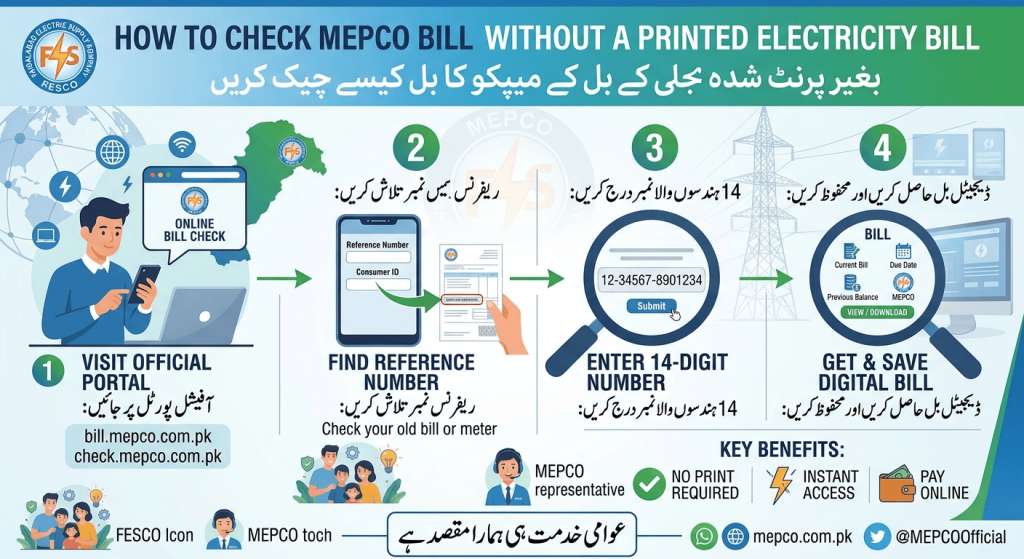
You do not necessarily need the physical bill to view your electricity charges. The main requirement is usually the reference number associated with your electricity connection.
Follow these steps:
- Open the MEPCO Online Bill website.
- Locate the bill-checking field on the page.
- Enter your electricity reference number in the required format.
- Submit the information to retrieve the available bill details.
- Review the billing month, total amount, and due date.
- If a duplicate bill is available, download it or use your browser’s print option.
Make sure the reference number is entered correctly. A typing mistake may prevent the system from finding your bill.
What Information Do You Need to Check Your MEPCO Bill?
When checking a bill online, you generally need an identifier linked to your electricity connection.
1. Electricity Reference Number
The reference number is commonly printed on previous MEPCO bills. It identifies the connection for bill retrieval and is often required by online duplicate-bill services.
If you have an older bill saved on your phone, computer, or email, look for the reference number there. You may also find a photograph or PDF of a previous bill in your files.
2. Consumer Details
Your name, service address, and other account details may help MEPCO staff identify your connection if you contact customer support. However, these details may not replace the reference number in an online bill-checking form.
3. Previous Bill Record
A screenshot, downloaded PDF, or photograph of an earlier bill can be useful even if the latest printed bill is missing. Keep a copy somewhere secure so you can retrieve the reference number when needed.
How to Find Your MEPCO Reference Number Without a Bill
If you do not have a printed bill or a saved copy, finding your reference number may take an extra step. Try these options before contacting customer support.
Check Your Phone or Email
Search your phone gallery, downloads folder, email inbox, and messaging apps for an old electricity bill. Useful search terms include “MEPCO bill,” “electricity bill,” and “duplicate bill.”
If you previously downloaded a PDF, open it and look for the reference number near the consumer or billing information.
Ask the Property Owner or Previous Account Holder
If you rent your home, the property owner may have an older electricity bill or know the connection details. Ask for the reference number associated with the meter at your property.
Make sure the details correspond to your current connection rather than another meter in the same building.
Contact MEPCO Customer Support
If you cannot locate your reference number, contact MEPCO through an official customer service channel. Explain that you need help identifying your electricity connection and ask which information or documents are required.
You can start by visiting the official MEPCO website or checking its available consumer service information. Do not rely on unverified phone numbers or share sensitive information with unofficial contacts.
How to Download a Duplicate MEPCO Bill
Once you have retrieved your bill online, saving a digital copy can help you avoid the same problem in the future.
- Open the bill displayed by the online service.
- Check that the consumer and billing details match your connection.
- Select the download option if one is available.
- Save the PDF to a familiar folder on your device.
- Rename the file with the billing month so it is easy to find later.
If the website does not offer a direct download option, you may be able to use your browser’s print function and choose Save as PDF. The exact options depend on your device and browser.
A digital copy can be useful for checking the amount due, reviewing charges, and keeping your payment records organized.
What Should You Check on Your Online MEPCO Bill?
After opening your bill, review the main details before making a payment.
- Billing month: Confirm that you are viewing the intended month’s bill.
- Total amount due: Check the payable amount shown on the bill.
- Due date: Note the deadline to avoid missing the payment date.
- Meter readings and units: Review the recorded consumption if this information is displayed.
- Previous balance and adjustments: Check whether any outstanding balance or adjustment has been included.
- Consumer information: Make sure the bill belongs to your electricity connection.
If anything looks incorrect, contact MEPCO through an official channel to ask about the issue. Viewing a duplicate bill does not automatically correct a billing error.
Can You Check Your MEPCO Bill Using Your CNIC or Mobile Number?
Many consumers wonder whether they can retrieve an electricity bill using only their national identity card number or mobile number.
The answer depends on the service being used. Standard online duplicate-bill tools commonly request the electricity reference number, and a CNIC or phone number may not be sufficient to retrieve the bill directly.
If you have neither the reference number nor an old bill, contact MEPCO and ask about its approved process for locating your connection. Avoid entering personal information into unfamiliar websites that promise instant bill access without explaining how they handle your data.
Common Problems When Checking a MEPCO Bill Online
Sometimes the bill does not appear even when you enter your details. The following solutions may help.
Incorrect Reference Number
Recheck every digit and remove accidental spaces if the form does not accept them. Use the format requested by the website.
Latest Bill Is Not Available
A newly issued bill may not appear immediately on every online service. Try again later or check an official MEPCO channel for the latest information.
Website Is Not Loading
Check your internet connection, refresh the page, or try another browser. If the service remains unavailable, use an official alternative rather than an unknown website.
Bill Details Do Not Match
If the displayed name, address, or connection details appear inconsistent, do not assume the bill belongs to you. Verify the reference number and contact MEPCO if the mismatch continues.
Tips to Avoid Losing Your Electricity Bill Details Again
A few simple habits can make future bill checks easier.
- Save each downloaded bill as a PDF.
- Keep a screenshot of your reference number in a secure location.
- Store bill records in a clearly named folder.
- Set a reminder for your usual bill-checking date.
- Use official or trusted services when checking account information.
- Keep payment receipts so you can confirm completed transactions.
These steps can save time if a printed bill is delayed, misplaced, or unavailable.
Frequently Asked Questions
Can I check my MEPCO bill without a printed bill?
Yes. You can generally retrieve an online bill using the reference number associated with your electricity connection. A physical copy is not usually required if you already have the necessary details.
What if I have lost my MEPCO reference number?
Look for an old bill in your email, phone gallery, downloads folder, or messages. If you cannot find it, contact MEPCO through an official customer service channel and ask how to identify your connection.
Can I download my MEPCO bill online?
If the online service provides your bill, you can usually download or print the displayed copy. The available options depend on the website and your browser.
Is an online duplicate bill the same as a printed bill?
An online duplicate generally shows the available billing details and can be useful for your records. However, payment acceptance and any requirements for a particular transaction depend on the payment provider.
What should I do if my bill does not appear online?
Check your reference number for mistakes and try again later if the latest bill has not yet appeared. If the problem continues, contact MEPCO using its official website or customer service channels.
Conclusion
Learning how to check MEPCO bill without a printed electricity bill can help you stay on top of your monthly payments even when a paper copy is missing. Start by finding your reference number in an old bill, email, or saved PDF, then use an online bill service to view the latest available charges and due date.
If you cannot find the reference number, contact MEPCO through an official channel and ask how to identify your connection. Save future bills digitally, verify the details before paying, and keep payment receipts for your records. These simple habits make electricity bill management easier and more convenient.